What is Server-Driven UI? The Definitive Guide


Alireza Fard
01/08/2025
Comprehensive definition of Server-Driven UI (SDUI) with real-world examples, benefits, trade-offs, and implementation details. Learn how SDUI transforms native iOS and Android development.
Server-driven UI (SDUI) is an architecture where the server controls what the UI renders, not just what data it shows, but the structure, layout, and behavior of the interface itself. Instead of the app deciding which components to display, it receives a description from the server and renders accordingly.
If you've ever wanted to ship a UI change on a Friday without submitting a new app build, server-driven UI is what you're looking for.
The Problem SDUI Solves
Traditional mobile development has a fundamental constraint: the UI lives in the binary.
When you want to change a button label, reorder a screen, or run an A/B test on your checkout flow, you have to:
- Make the change in code
- Build a new binary
- Submit to App Store / Google Play review (1–3 days on average)
- Wait for users to update (weeks to months for full adoption)
For web teams, this sounds absurd. Deploy a change and it's live in seconds. Mobile teams accept this as the cost of native development, but it doesn't have to be.
Server-driven UI shifts the UI definition to the server. The app becomes a rendering engine. Changes ship instantly, reach 100% of active users immediately, and can be rolled back just as fast.
What Exactly Is Server-Driven UI?
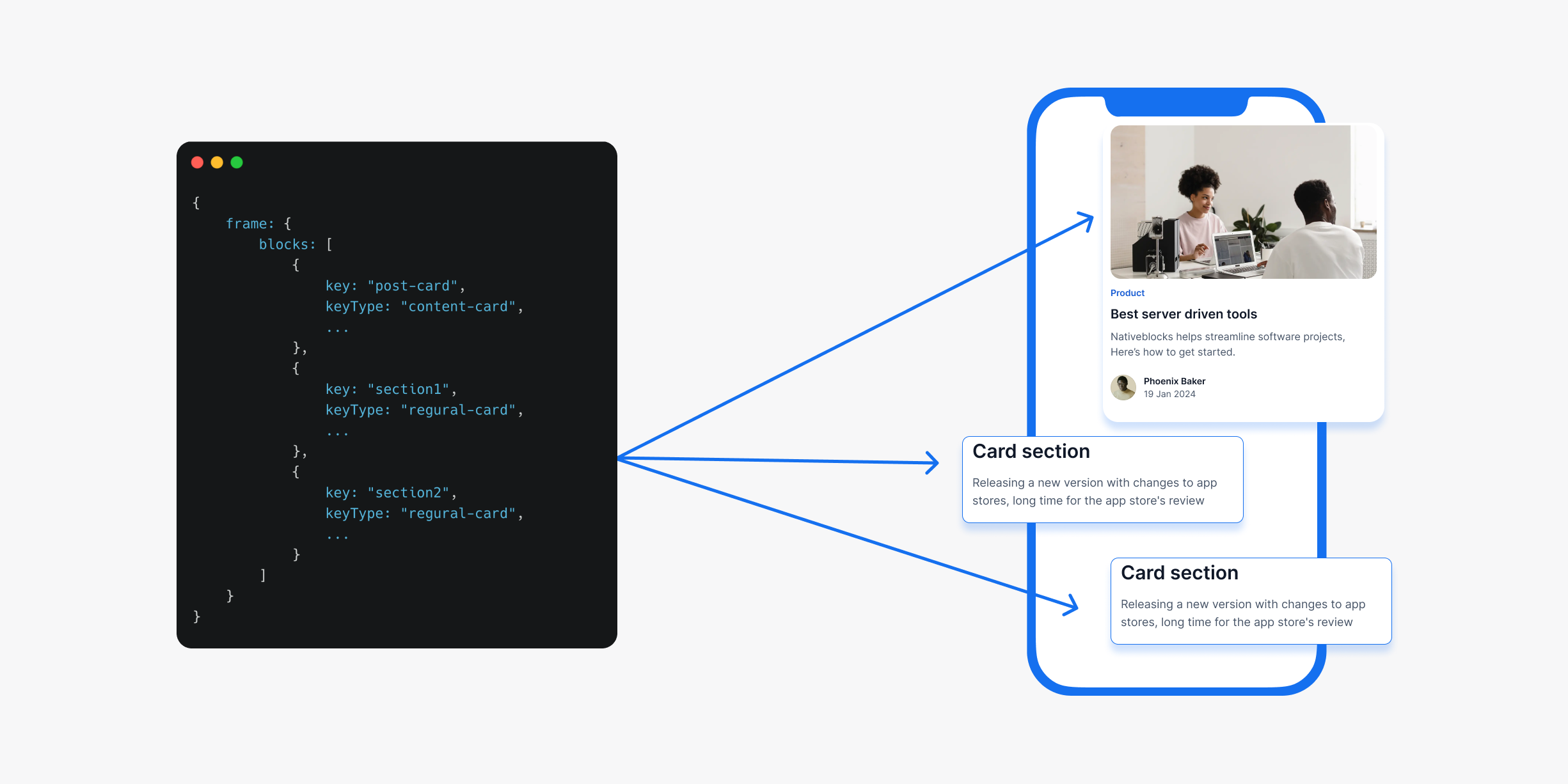
At its core, server-driven UI means the server sends a description of the interface, and the client renders it.
Traditional approach:
Server → Data → Client decides what to show → Renders UI
Server-driven UI:
Server → UI description + Data → Client renders what it's told
The "UI description" is typically a JSON payload that describes which components to use, how to arrange them, what data to populate, and what actions to wire up.
Here's a practical example. In traditional app development, a shop listing screen has every element hardcoded: search bar position, filter buttons, product cards layout, price displays, and navigation tabs. To change the filter options or rearrange the cards, you'd update code, test it, submit to app stores, and wait for users to update.
With server-driven UI, the app becomes a smart rendering engine that asks the server: "What should this screen look like?"

Traditional approach:
// Hardcoded in iOS app
struct ProductListView: View {
    var body: some View {
        VStack {
            SearchBar(placeholder: "Search...")
            HStack {
                FilterButton(title: "Price")
                FilterButton(title: "Type")
                FilterButton(title: "Features")
            }
            LazyVGrid(columns: gridLayout) {
                ForEach(products) { product in
                    ItemCard(product: product)
                }
            }
            TabView()
        }
    }
}
Server-driven approach: instead of hardcoded views, your app requests a JSON schema that defines the entire screen structure, component arrangement, and behavior dynamically.
{
  "screen_type": "listing",
  "components": [
    {
      "type": "search_bar",
      "placeholder": "Search...",
      "position": 0
    },
    {
      "type": "filter_container",
      "orientation": "horizontal",
      "position": 1,
      "children": [
        { "type": "filter_button", "text": "Price", "action": "show_price_filter" },
        { "type": "filter_button", "text": "Type", "action": "show_type_filter" },
        { "type": "filter_button", "text": "Features", "action": "show_features_filter" }
      ]
    },
    {
      "type": "card",
      "position": 2,
      "image_url": "https://example.com/img1.jpg",
      "price": "$600,000",
      "location": "Nothing phone",
      "save_action": "save_1"
    },
    {
      "type": "tab_navigation",
      "position": 3,
      "tabs": [
        {"name": "Home", "icon": "home", "active": false},
        {"name": "Explore", "icon": "search", "active": true},
        {"name": "Inbox", "icon": "message", "active": false},
        {"name": "Profile", "icon": "user", "active": false}
      ]
    }
  ]
}
The client receives this JSON, parses it, and renders the appropriate native components. The same server response can drive an iOS app, Android app, and web app, each rendering a platform-appropriate interface that feels native to users.
A Brief History
Server-driven UI wasn't invented at a startup. It emerged from the scale problems of the largest mobile teams in the world.
Facebook (2012–2015) was among the first to formalize SDUI at scale. Their news feed, one of the most complex personalized feeds in existence, needed to change rapidly without app releases. They built a system where the server described feed items as components, and the app rendered them. This later evolved into their GraphQL-based architecture.
Airbnb (2017) published a widely-read post about their "Ghost Platform," a server-driven UI system that let them ship product changes across iOS, Android, and web simultaneously. Their insight: if the server owns the layout, you can run true cross-platform experiments.
Lyft built a similar system for their driver and rider apps, motivated by the same problem: A/B testing UI changes across millions of users without waiting for release cycles.
Shopify uses SDUI extensively in their merchant app, allowing them to iterate on the seller experience without the friction of coordinated releases.
These weren't small experiments. They were fundamental architectural decisions made by teams that could not afford to be slow.
How Server-Driven UI Works
A server-driven UI system has three parts:
1. The Component Registry
The app ships with a finite set of registered components, the building blocks the server is allowed to use. Think of it as the app's vocabulary.
// iOS example
registry.register("hero_banner", HeroBannerView.self)
registry.register("product_grid", ProductGridView.self)
registry.register("text_block", TextBlockView.self)
registry.register("cta_button", CTAButtonView.self)
The server can only use components that exist in the registry. This is both a constraint and a safety mechanism: you can't ask the app to render something it doesn't know how to render.
2. The Schema / Protocol
This is the contract between server and client. It defines:
- What components exist
- What properties each component accepts
- What actions are available
- How components can be nested
A well-designed schema is versioned, typed, and validated on both ends.
3. The Renderer
The renderer is the engine that takes the server's JSON payload and walks the component tree, instantiating the right native component for each node and wiring up the properties and actions.
// Android example
fun render(node: UINode): View {
    return when (node.type) {
        "hero_banner" -> HeroBannerView(context).apply {
            bind(node.properties)
            wireActions(node.actions)
        }
        "product_grid" -> ProductGridView(context).apply {
            bind(node.properties)
        }
        else -> FallbackView(context) // graceful degradation
    }
}
The renderer recurses through the tree, building the native UI from the description.
Types of Server-Driven UI
Not all SDUI implementations are the same. They exist on a spectrum:
Layout-Driven SDUI
The server controls the full structure of the screen: which components appear, in what order, with what layout. This is the most powerful form and what most people mean by "server-driven UI."
Best for: product pages, home screens, marketing surfaces, onboarding flows.
Data-Driven UI
The structure is fixed in the app, but the server controls what content fills it. Closest to traditional development with a CMS layer.
Best for: content-heavy apps, news apps, documentation.
Action-Driven UI
Components are fixed, but the server controls what happens when users interact with them: navigation destinations, API calls, state changes.
Best for: feature flagging, experiment-driven behavior changes.
Hybrid (Most Common in Practice)
Most production SDUI systems combine all three. The server controls layout for some screens, data for others, and behavior via configuration throughout.
Benefits of Server-Driven UI
Ship UI changes without app releases
The most obvious benefit. Change a button color, reorder a section, add a new component to a screen, all without submitting a build. Changes are live as soon as the server deploys.
Instant rollbacks
If a UI change causes problems, roll it back on the server. No waiting for an emergency release to clear review, no coordinating hotfix deployments. Change the JSON, push to server, done.
True A/B testing on native
With traditional native development, running a UI experiment means shipping two variants in the same binary and toggling between them with a flag. With SDUI, you send different UI trees to different user segments. The app doesn't know about the experiment; the server does. This is how Airbnb ran hundreds of experiments simultaneously on their native apps.
Consistent cross-platform behavior
When the server controls the layout, iOS and Android users see the same thing by default. You implement the components once per platform, but the layout decisions are made once on the server.
Personalization at scale
Different users can see completely different layouts optimized for their specific needs, browsing patterns, or purchase history, all driven by the same underlying system.
Challenges and Trade-offs
Server-driven UI is not free. It trades one set of problems for another.
Increased upfront complexity
You're building a rendering engine, not just a screen. The component registry, schema design, renderer logic, action handling, and fallback behavior all need to be built before you ship a single SDUI screen. The investment pays off over time, but the initial cost is real.
Network dependency
Every screen render requires a server response. If the network is slow or unavailable, you need a strategy: cached last-known-good state, skeleton screens, or a static fallback. Traditional apps render from bundled code; SDUI screens have a round-trip cost.
Offline support is harder
If your app needs to work fully offline, server-driven UI requires careful cache design. You need to decide what to cache, for how long, and what the experience looks like when the cache is stale.
Debugging complexity
When something looks wrong on screen, the bug could be in the server payload, the schema, the renderer, or the component itself. Tracing through multiple layers is harder than debugging a single codebase. Good tooling (payload inspection, component testing, visual diffing) is essential.
Type safety across the boundary
The JSON boundary between server and client is a weak point. A server sending a property the client doesn't expect, or a typo in a component name, silently degrades rather than failing at compile time. Strong schema validation and contract testing are necessary to compensate.
Not everything belongs in SDUI
Complex interactive flows (forms with validation, animated transitions, gesture-driven interfaces) are hard to express in a JSON schema without the schema becoming its own programming language. SDUI is best for layouts and content surfaces, not for every screen in your app.
Server-Driven UI vs Alternatives
vs Code Push
Code push (OTA updates) delivers new JavaScript or Dart code to an already-installed app, bypassing the app store for that delta.
| Server-Driven UI | Code Push | |
|---|---|---|
| Works for native Swift/Kotlin | Yes | No |
| Requires schema design | Yes | No |
| Can push new logic | No | Yes (JS/Dart only) |
| App store compliant | Yes | Depends |
| Instant rollback | Yes | Yes |
| Offline capable | With caching | Yes |
When to use code push: React Native or Flutter apps that need to ship logic changes, not just UI.
When to use SDUI: Native iOS/Android apps, or any app where layout changes are more common than logic changes.
vs Feature Flags
Feature flags (LaunchDarkly, Statsig, Firebase Remote Config) let you toggle features on or off, or run A/B experiments, but only within UI that's already in the binary.
| Server-Driven UI | Feature Flags | |
|---|---|---|
| Can add new components | Yes | No |
| Can reorder layout | Yes | No |
| Can change copy/content | Yes | Partially |
| Complexity | High | Low |
| Setup time | Weeks | Hours |
Feature flags are a complement to SDUI, not a replacement. Use feature flags for simple toggles and SDUI for layout-level changes.
vs WebViews
Embedding a web view gives you full web-speed iteration for that screen, at the cost of native feel, performance, and access to platform APIs.
| Server-Driven UI | WebView | |
|---|---|---|
| Native performance | Yes | No |
| Native look and feel | Yes | Approximately |
| Platform API access | Yes | Limited |
| Iteration speed | Fast | Fastest |
| Offline support | With caching | With service workers |
WebViews are a pragmatic escape hatch for content-heavy screens where native fidelity isn't critical. For anything interactive or performance-sensitive, SDUI gives you the same speed with native rendering.
When to Use Server-Driven UI
Good use cases
- Home screens and feeds: highly personalized, frequently changing, high business value
- Marketing and promotional surfaces: banners, sale pages, seasonal content
- Onboarding flows: frequently iterated, A/B tested, needs to change without releases
- Product listing and detail pages: content-heavy, server-controlled
- Settings and configuration screens: low interaction complexity, frequently updated
- Notification and in-app message templates
Poor use cases
- Complex forms: multi-step validation, conditional logic, dynamic field dependencies
- Highly animated interfaces: custom transitions, gesture-driven interaction
- Screens with heavy platform integration: camera, maps, AR, biometrics
- Authentication flows: security-sensitive, needs to be in the binary
- Anything that must work fully offline from first launch
If the screen is primarily about showing content and navigating between it, it's a good SDUI candidate. If it's primarily about capturing complex user input or deep platform integration, keep it in native code.
Real-World Examples
Meta / Facebook
Facebook's news feed is one of the most well-known SDUI implementations. The server sends a description of each story card (text, images, action buttons, reactions) and the app renders it. This allows Facebook to change the feed UI for any user segment at any time without a release. Their system is built on top of GraphQL and uses a component-based schema.
Airbnb
Airbnb's "Ghost Platform" let their product teams ship independently across iOS, Android, and web. A product manager could launch an experiment on the search results page without coordinating separate iOS and Android releases. Their system used a strongly-typed schema and a shared component library across platforms.
Lyft
Lyft built SDUI for their driver-facing app, where UI changes are high-stakes (drivers see the app while working). Being able to roll back a bad UI change instantly, rather than waiting for a hotfix, was a safety concern, not just a convenience.
Shopify
Shopify's merchant app uses server-driven UI for the seller dashboard, allowing their team to iterate rapidly on the seller experience across a global merchant base with diverse needs. Different merchants see different UI based on their plan, region, and business type.
How to Implement Server-Driven UI
Step 1: Define your component registry
Start with a small, focused set of components. Don't try to SDUI everything; pick the screens with the highest iteration frequency.
Common starter components:
- Text block (heading, body, caption)
- Image
- Button / CTA
- Container / stack (horizontal, vertical)
- Separator
- Card
- List / grid
Step 2: Design your schema
Your schema is the contract. Design it carefully, as changing it later has migration costs.
Key decisions:
- How do you express actions? (navigate, API call, track event, show modal)
- How do you handle data binding? (static values vs. dynamic data references)
- How do you version the schema? (client version negotiation, backwards compatibility)
- How do you handle unknown components? (fallback component, skip node, show error)
Step 3: Build the renderer
The renderer is the heart of the system. It should:
- Walk the component tree recursively
- Instantiate the right native component for each node
- Bind properties from the schema to the component
- Wire up actions to the appropriate handlers
- Handle unknown nodes gracefully (fallback or skip)
Step 4: Handle fallbacks and error states
Every SDUI screen needs a story for:
- Network failure (cached content, static fallback, retry UI)
- Unknown component type (fallback component, skip and continue rendering siblings)
- Invalid schema (validate before render, surface errors in development)
- Slow response (skeleton screens, progressive loading)
Step 5: Implement caching
Decide on your caching strategy before you ship:
- Cache the last successful response per screen
- Use ETags or cache headers for efficient invalidation
- Define TTLs appropriate to how frequently each screen changes
- Handle stale content gracefully (show with indicator, refresh in background)
Step 6: Add tooling
SDUI is much harder to debug without tooling:
- Payload inspector: view the raw JSON for any screen in development
- Component preview: render any component in isolation with given properties
- Schema validator: catch contract violations at the boundary, not in the renderer
- Visual diff: compare before/after screenshots when schema changes
Schema Versioning
Schema versioning is the SDUI problem teams discover too late.
You will have users on old app versions for months or years. Your server must continue to serve schemas those versions can render. Without a versioning strategy, every schema change risks breaking old clients.
Common approaches:
Client version negotiation: The client sends its supported schema version with every request. The server responds with a payload the client can render.
GET /api/screen/home
X-Schema-Version: 3
Backwards-compatible schema evolution: Only add new fields (never remove or rename). Old clients ignore unknown fields. New clients use them.
Component-level versioning: Each component has a version. The client declares which version of each component it supports. The server uses the highest compatible version.
The simplest advice: treat your schema like a public API. Changing it has a cost. Design it carefully upfront, evolve it backwards-compatibly, and never remove things until old client versions are below an acceptable threshold.
Best Practices
Start small. Pick one high-value screen and build the full stack for it. Don't try to SDUI your whole app at once.
Define the component contract strictly. Every property should have a type, default value, and documented behavior. Loose schemas cause subtle rendering bugs.
Always handle the unknown component case. Your renderer will encounter component types it doesn't know about, either because the server sends a new component the old client doesn't have, or because of a typo. Never crash. Skip the unknown node, or render a fallback.
Test with bad payloads. Regularly test your renderer with malformed, incomplete, and unexpected schemas. Production servers send bad data. Your renderer should be resilient.
Measure render performance. A SDUI renderer adds overhead compared to static layouts. Measure frame times and scroll performance. Optimize the renderer hot path; it runs for every component on every screen.
Log schema errors in production. When the renderer encounters something unexpected, log it. This is your early warning system for schema drift between server and client.
Keep actions simple. The temptation is to make actions Turing-complete (conditional logic, loops, complex state machines expressed in JSON). Resist it. Complex logic belongs in code. Actions should be: navigate, API call, track event, show/hide component. Anything more complex should be a native behavior triggered by a simple action.
Tools and Frameworks
For native iOS and Android
- Nativeblocks: purpose-built SDUI platform for native iOS and Android; handles the renderer, schema, component registry, and visual tooling
- Judo: iOS-focused, SwiftUI-based SDUI; good for marketing screens
For Flutter
- Flutter RFW (Remote Flutter Widgets): Google's official SDUI solution for Flutter
For React Native
- Builder.io: mature visual + code SDUI with strong React/Next.js integration
- Plasmic: code-first visual builder
Build your own
At sufficient scale, most teams build custom SDUI systems. The open source landscape is sparse because SDUI systems are tightly coupled to each team's component library and design system. The concepts in this guide apply regardless of which approach you take.
Is Server-Driven UI Right for You?
Server-driven UI is a significant architectural investment. It pays off when:
- You ship native apps (iOS and/or Android)
- You iterate frequently on UI, at least weekly
- App store review cycles are a meaningful bottleneck
- You run A/B tests and need to move faster than your release cycle allows
- You have screens that differ significantly by user segment, geography, or plan tier
It's probably not worth it when:
- Your app rarely changes UI after launch
- Your team is small and the engineering investment isn't justified
- Your app is primarily logic-heavy with simple, stable UI
- You're already on React Native or Flutter with code push available
Summary
Server-driven UI moves UI ownership from the client binary to the server. The app becomes a rendering engine for a component vocabulary; the server decides what to render and when.
The payoff is significant: ship UI changes without app store releases, run true A/B experiments on native, roll back bad changes in seconds, and reduce the coordination cost of mobile product iteration.
The cost is real: more upfront architecture, schema design discipline, caching strategy, and tooling investment.
For teams building native apps that need to move fast, server-driven UI is not a nice-to-have. It's the architecture that makes the iteration speed you need possible.